Use an asset
Beginner
Assets can be referenced by other assets or components in a scene.
Components and other assets
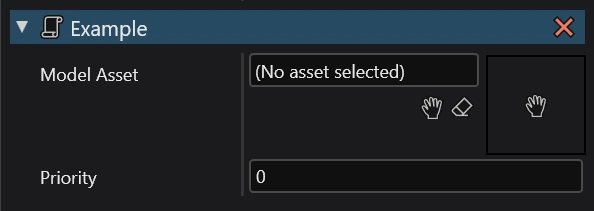
In the Property grid, you can sometimes find a property that looks like this:

In here, you can assign a reference to another asset. There are two available buttons:
- Hand - opens up a dialogue to select an existing asset.
- Eraser - clears the reference.
Tip
You can also drag and drop an asset from the Asset view.

Your own scripts
You can create an assignable reference to an asset in your script by creating a property or field with an asset type.
public Model ModelAsset { get; set; }
This will show up in the Property grid like so:
Using this method, the asset will be loaded and assigned automatically. Stride also provides a way of managing loading manually. For more information, visit Use an asset in code.