Graphics API
Intermediate
Graphics APIs are responsible for performing basic rendering operations. They differ in platform availability and have their own benefits and drawbacks.
Supported graphics APIs
Stride has support for the following APIs:
Direct3D11
Available on platforms: Windows
Direct3D is a graphics API developed by Microsoft. Stride's implementation for version 11 is the most mature, which is why it's used as the default on Windows.
Direct3D12
Available on platforms: Windows
Version 12 of Direct3D is the newest release of the API. Currently, Stride's implementation for it isn't as stable as the one for 11, which is why it isn't used by default.
Vulkan
Available on platforms: Windows, Linux, MacOS, Android, iOS
Vulkan is a modern graphics API that provides great performance benefits and control over how rendering is performed. It's used as the default on non-Windows platforms.
Changing the graphics API
Note
Currently all non-Windows platforms can only use Vulkan, as Direct3D is Windows-exclusive.
In the Solution explorer select the Windows platform package (the one that ends with
.Windows).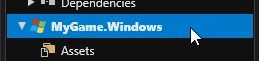
In the Property grid find a property named Graphics API and change it to your desired value.
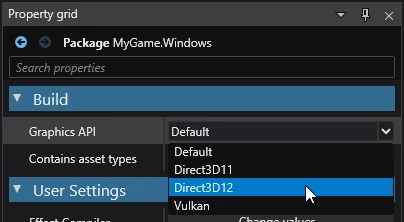
Changing the editor API
Game Studio's graphics API is set independently from the game. To change it, go to Edit > Settings > Environment > Graphics API (editor only). The new api will be used after editor restart.

You can also force the usage of a specific API from the command line by passing the --graphics-api ApiNameHere flag or setting the environment variable STRIDE_GRAPHICS_API to your desired value.
Checking the API at runtime
You can check which API your project is using from GraphicsDevice.Platform.
public override void Update()
{
    DebugText.Print($"Graphics API: {GraphicsDevice.Platform}", new(50, 50));
}
Building the engine with a different API
When building the engine from source code, it will only contain support for your OS's default graphics API. To build all APIs, set StrideGraphicsApiDependentBuildAll to true in build parameters.
msbuild -p:StrideGraphicsApiDependentBuildAll=true ./build/Stride.sln
To only build selected APIs, set the StrideGraphicsApis property to your desired values.
msbuild -p:StrideGraphicsApis=`"Api1`;Api2`" ./build/Stride.sln