Key concepts
Beginner
This article highlights most important concepts that are used in the engine.
Scenes
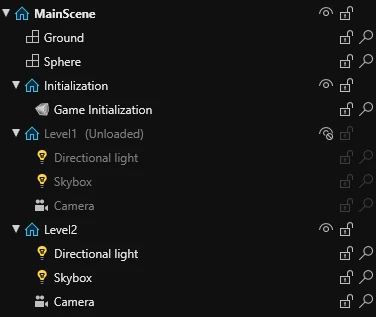
A scene is a collection of entities that can be loaded and unloaded on demand. Most often, they contain different levels of a game or menus.
In Stride, scenes can contain sub-scenes that can be managed separately from each other.
Entities
Entities represent different objects in a scene, like the player, enemies, walls, etc. They contain components that dictate how they look and behave.
Components
Components are customizable pieces of code that can be added to entities in order to bring new functionality to them. For example: a player movement component that makes an entity move, when keyboard buttons are pressed.
In code, a component is a class that inherits StartupScript, SyncScript or AsyncScript.
using Stride.Engine;

namespace MyGame;

public class MyComponent : StartupScript
{
    public override void Start()
    {
        // Write your code here
    }
}
Script types
In Stride, a component can be created from one of 3 types of script:
- Startup Script - a script that runs only once when it's added.
- Sync Script - a script that runs when it's added and then every frame.
- Async Script - an asynchronous script that runs only once when it's added, but can await the next frame continuously.
For more information, read Types of script.
Assets and resources
An asset is a representation of an element in the project (like a texture), that contains a list of it's properties in the engine (e.g. .sdmat .sdprefab).
A resource is a file on the disk containing data, like an image (e.g. .png .mp3), that's used in the project.
Assets do not contain resource data. Instead, they reference a resource. For example: a texture asset (.sdtex) has a reference to an image (.png) that is located in the resource folder.
Project structure
A Stride project is separated into multiple project packages, which contain their own code, assets and resources.
For example, a new project consists of:
- MyGame.Game - contains content for the game.
- MyGame.NameOfPlatform (such as MyGame.Windows) - contains content specific to the version of the game for a specific platform (like the window icon).
For more information, read Project structure.